Hardware / August 25, 2026 / 13 min read
I Built a 48 GB VRAM Local AI Workstation with Two RTX 3090s
Two used 3090s, a £100 Threadripper Pro, a WRX80 board from China, and enough PCIe lanes to keep adding GPUs.
On this page
- Hardware and cost
- Finding a WRX80 motherboard
- 128 GB of ECC DDR4
- Why an open mining frame
- The CPU cooler does not quite fit
- 250 W power limits
- Networking, IPMI and the blocked power button
- Debian, llama.cpp and llama-swap
- What 48 GB of VRAM actually changed
- Qwen3.8-27B Q4_K_M Benchmark Results
- Running Llama 3.3 70B
- Why I usually run newer 27–35B models
- Expansion plans and verdict
I built this machine in July 2026 because 24 GB of VRAM had started to annoy me.
A single RTX 3090 can run a lot of current models, especially around 20–30B at Q4, but higher quants, larger KV caches and longer contexts kept leading back to the same limit. I had also wanted to run 70B models locally for years without pushing half the model through system RAM.
The cheapest route I could find to 48 GB of CUDA VRAM was still two used RTX 3090s.
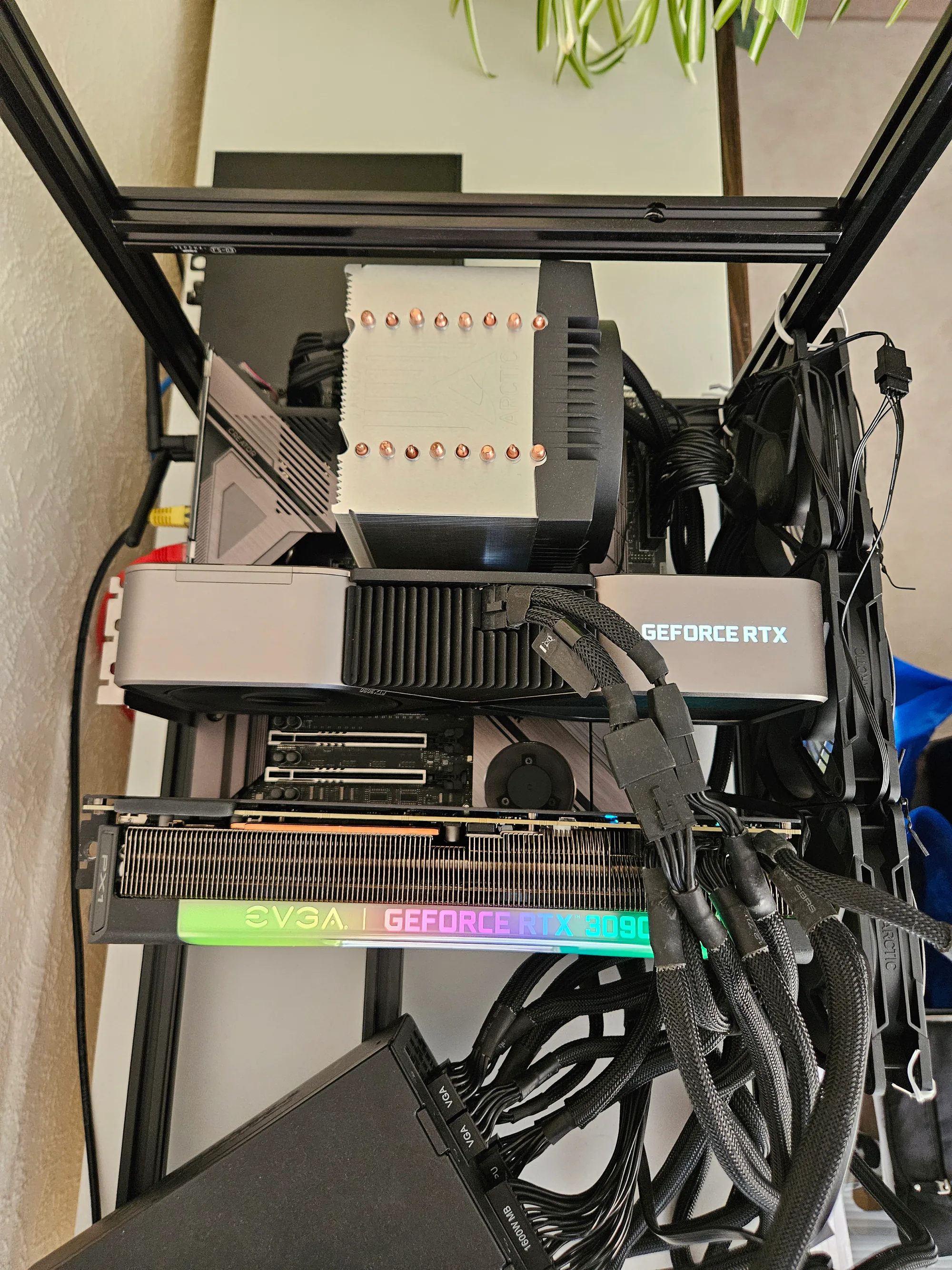
The finished machine has an RTX 3090 Founders Edition and an EVGA RTX 3090 FTW3 on an ASRock WRX80 Creator R2.0 with a Threadripper PRO 3945WX and 128 GB of ECC DDR4. Both GPUs run directly from CPU PCIe lanes at x16/x16.
Total cost was somewhere around £2,500–£3,000. I did not keep sufficiently disciplined records to give a fake-precise number.
Hardware and cost
| Part | Hardware | Cost / notes |
|---|---|---|
| CPU | AMD Threadripper PRO 3945WX | About £100 |
| Motherboard | ASRock WRX80 Creator R2.0 | About £500–£600 from Taobao |
| GPU 1 | RTX 3090 Founders Edition, 24 GB | Used, Facebook Marketplace |
| GPU 2 | EVGA RTX 3090 FTW3, 24 GB | Used, Facebook Marketplace |
| RAM | 128 GB DDR4-2666 ECC RDIMM | About £250–£300; four channels populated |
| PSU | Super Flower 1600 W Platinum | Plenty for the current two-GPU configuration |
| CPU cooler | ARCTIC Freezer 4U SP3 | One fan removed for clearance |
| Storage | Lexar M.2 NVMe | Exact model unimportant |
| Frame | Six-GPU open mining frame | Bought for spacing and future expansion |
The £100 Threadripper PRO is probably the best-value part in the whole machine.
The 3945WX only has 12 cores, which is completely adequate because most inference work lives on the GPUs. What I wanted was the platform attached to it: lots of PCIe lanes, ECC RDIMM support and enough memory bandwidth to leave useful CPU-offload options later.
The strange bit is spending roughly five times as much on the motherboard as the processor.
Finding a WRX80 motherboard
WRX80 pricing is backwards.
The CPUs became cheap after old workstations started being broken for parts, while the useful motherboards stayed scarce. I could find 3945WX processors around £100 without much effort, but comparable WRX80 boards in Europe were either missing entirely or listed at prices that made little sense. ASUS WRX80 SAGE boards were commonly above £1,000 on eBay when I was looking.
I had already gone through most of this while researching multi-GPU motherboards for local AI, so I eventually bought an ASRock WRX80 Creator R2.0 from Taobao for roughly £500–£600.
Shipping a rare workstation motherboard from China is not a particularly relaxing purchase, but I could not find anything comparable in Europe for close to the same money.
The ASRock gives me enough direct PCIe connectivity to run both 3090s at x16, with slots still available for more cards. I am not using risers because two cards fit directly. I also skipped NVLink. Bridges have become expensive enough that I could not justify one for a feature I did not need: llama.cpp can split models over both GPUs through PCIe.
128 GB of ECC DDR4
The machine has 128 GB of DDR4-2666 ECC RDIMM, with four memory channels populated.
The RAM cost around £250–£300, which irritated me more than the motherboard because the CPU itself only cost £100.
WRX80 supports eight memory channels, so there is still an obvious upgrade path if CPU offload starts mattering more. I have not needed it yet. Most current models either fit entirely across the GPUs or only use system RAM for relatively small spillover. The existing 128 GB also leaves ample space for the OS, model files, caches and background services.
Why an open mining frame
Two 3090s take up an absurd amount of space. The EVGA FTW3 in particular makes normal case layouts awkward, and I wanted a path to three or four GPUs without rebuilding the machine around a different chassis.
A cheap six-GPU mining frame solved the geometry problem. The cards have plenty of air around them, every PCIe slot is accessible, and I can add risers later when direct mounting stops being practical.
The frame itself is fairly crude. Its fan mountings did not line up properly, so several fans are temporarily held on with cable ties. I am not claiming this as a clever mounting system. It was the fastest way to put airflow where I wanted it, and the temperatures were good enough that I stopped caring about making it prettier.
The CPU cooler does not quite fit
The 3945WX uses an ARCTIC Freezer 4U SP3. The cooler normally has fans on both sides, but the exhaust-side fan interfered with the motherboard layout, so I removed it.
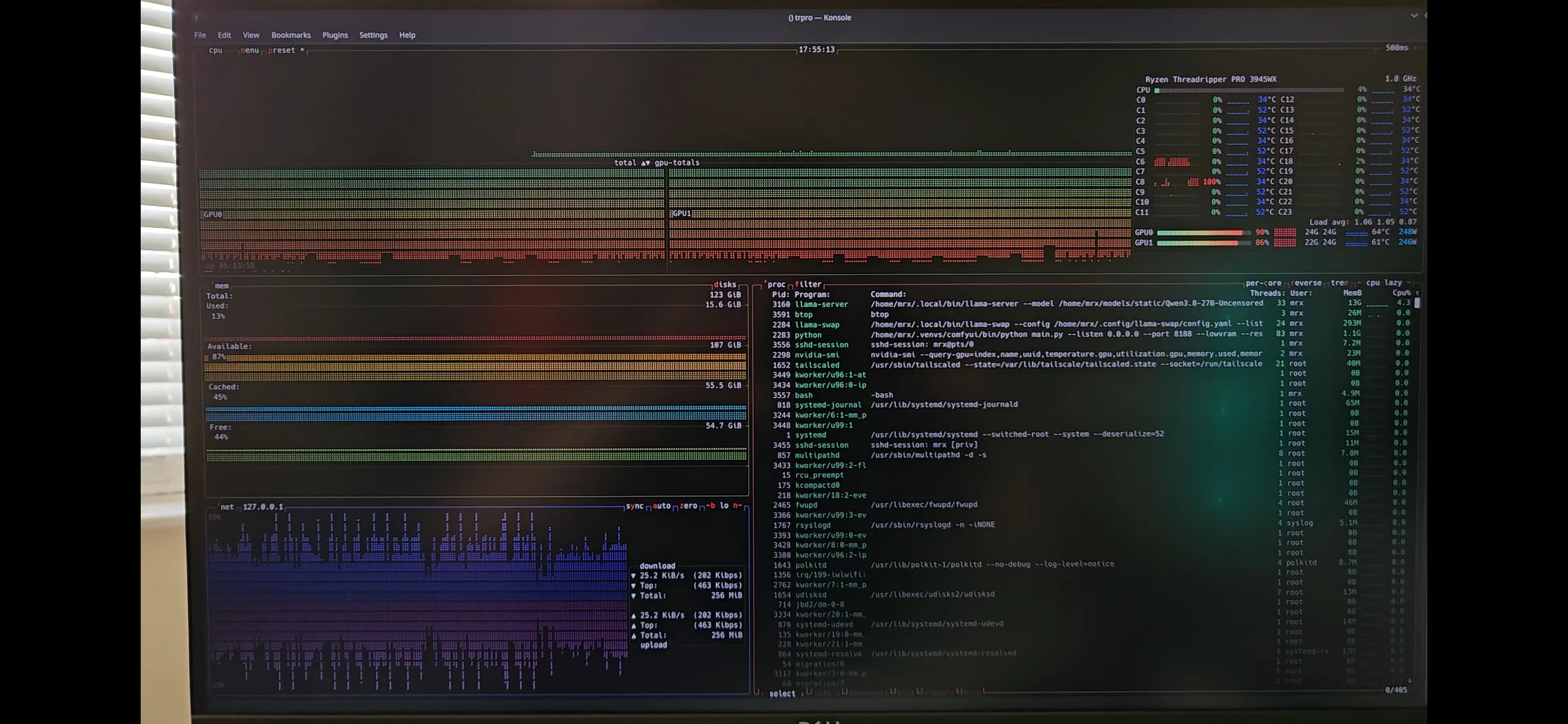
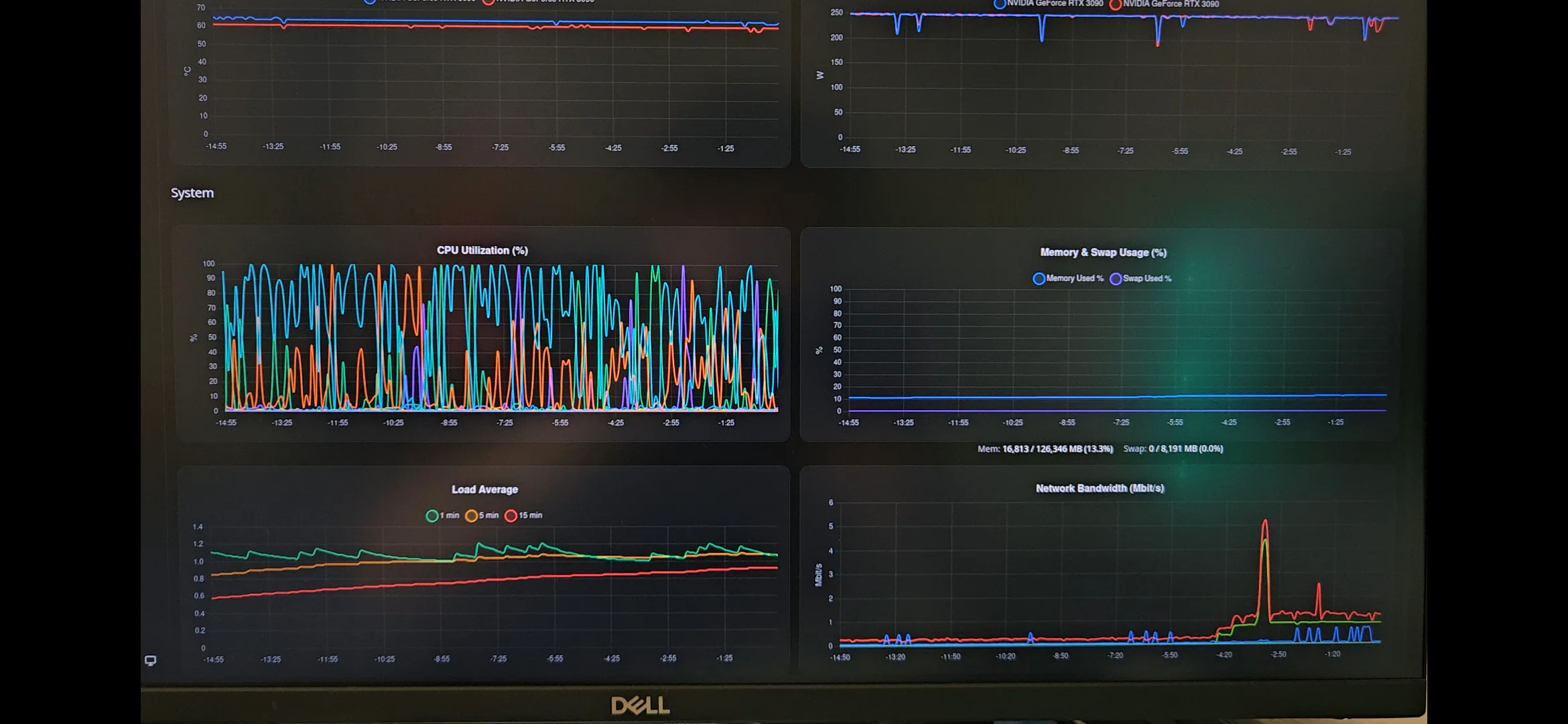
CPU temperatures still stay below roughly 35°C in the workloads I run because the processor spends most of its time lightly loaded. I could redesign the airflow around it, but there is no thermal reason to do that yet.
250 W power limits
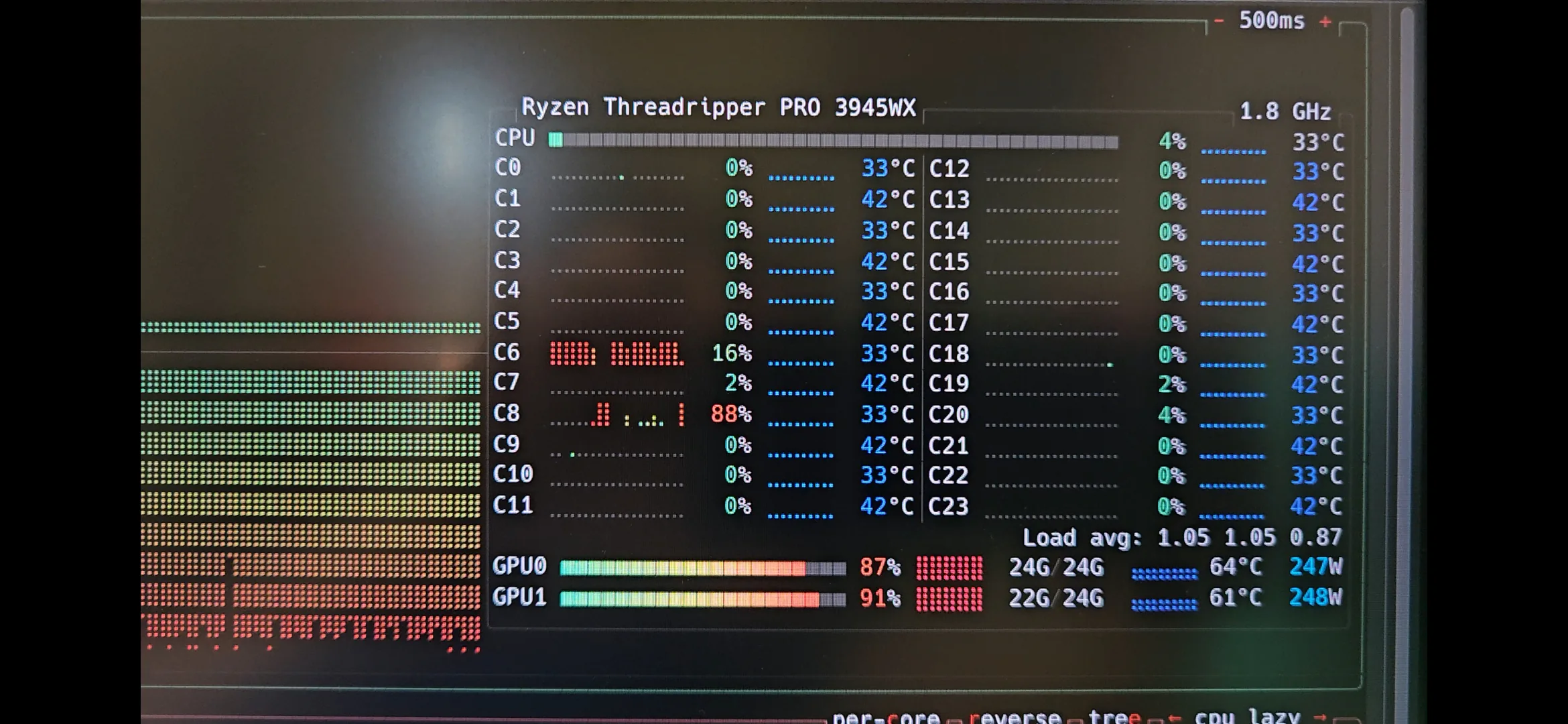
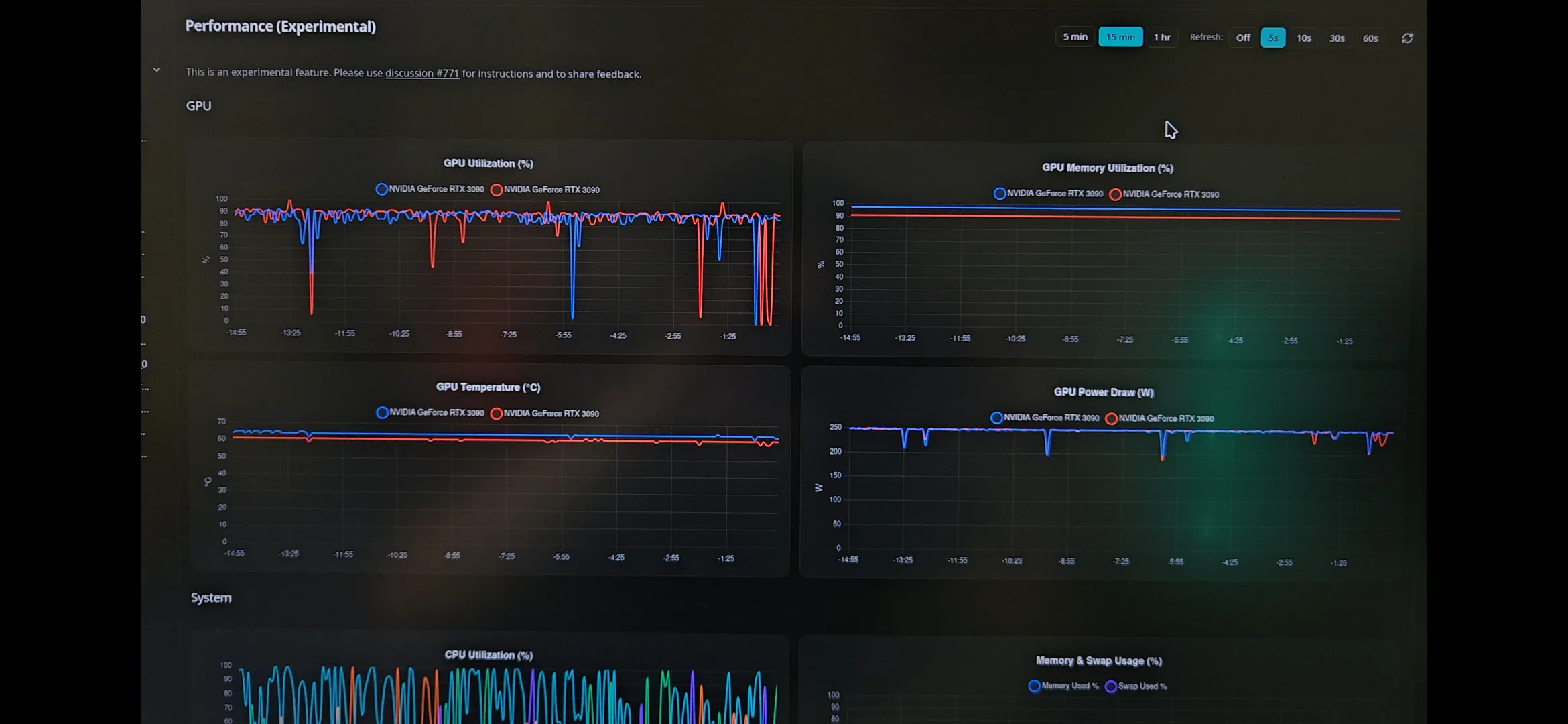
I run both 3090s at 250 W most of the time.
The original board power limit is 350 W, but token generation on these cards is heavily constrained by memory bandwidth. Reducing the power limit hurts prompt processing more than generation, and at 250 W I do not perceive enough generation-speed loss to justify another 200 W of combined heat.
My older multi-model dual-3090 comparison dataset was measured at 275 W per card. The newer Qwen3.8-27B Q4_K_M results below use my current 250 W per-card limit. The RTX 3090 inference article explains why the 250–290 W range works well for inference.
The open frame helps. There is no hot box around the GPUs and no need to make two large open-air coolers fight over the same few centimetres of case intake.
Networking, IPMI and the blocked power button
The WRX80 Creator has 10 Gb networking, but I do not own a 10 Gb switch yet. The machine currently uses ordinary RJ45/Cat5 gigabit Ethernet.
Two Ethernet cables go to the switch. One carries the normal Debian network and internet connection; the other serves the BMC/IPMI management interface.
The board’s remote management supports Redfish, so I can turn the machine on and off without a monitor, keyboard or physical access. That became useful faster than expected because one of the enormous GPUs blocks access to the motherboard’s physical power button. Remote power control is now how I normally start it.
A 10 Gb switch is somewhere on the list because moving 30–50 GB model files over gigabit gets tedious quickly.
Debian, llama.cpp and llama-swap
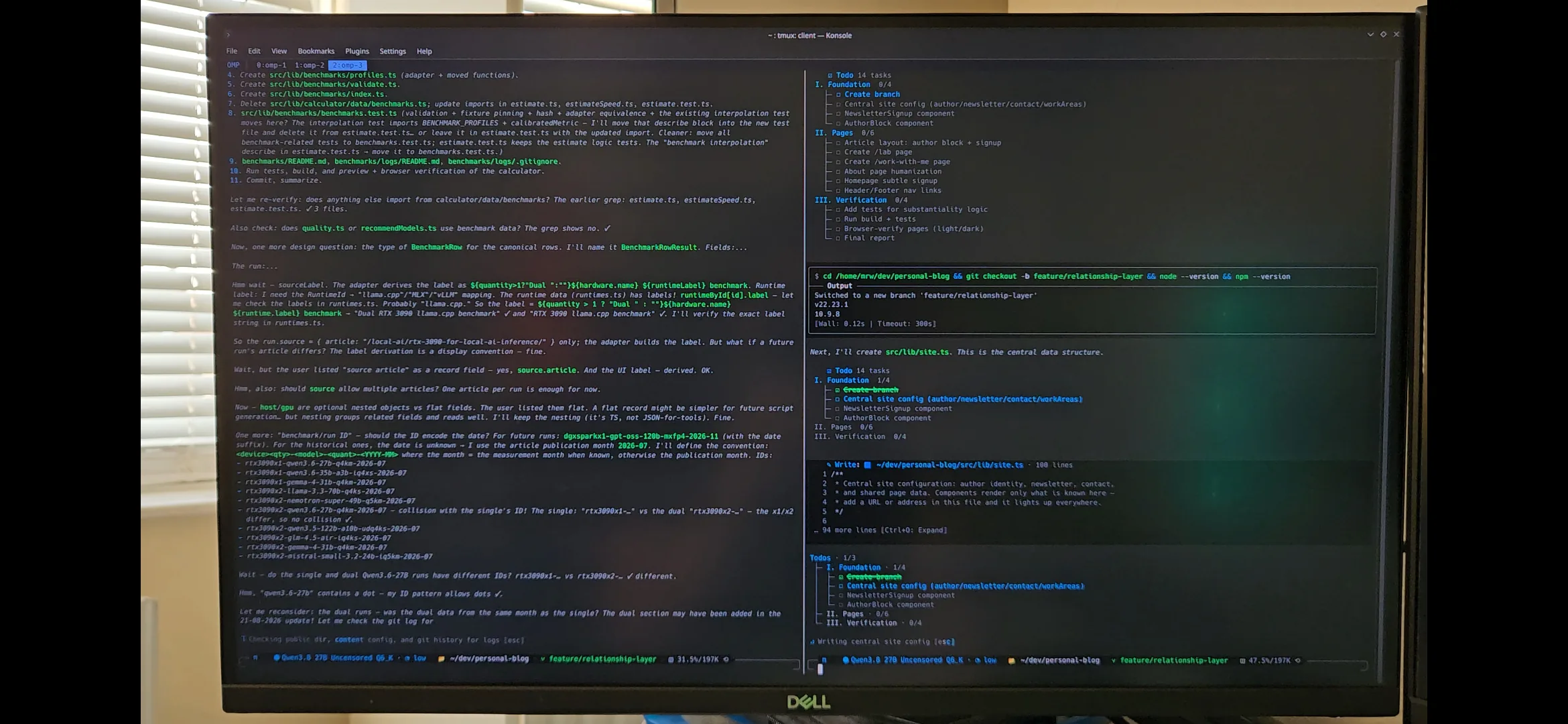
The host runs Debian Server. Inference is mostly llama.cpp through llama-server, with llama-swap managing model configurations and loading the right server when a request arrives.
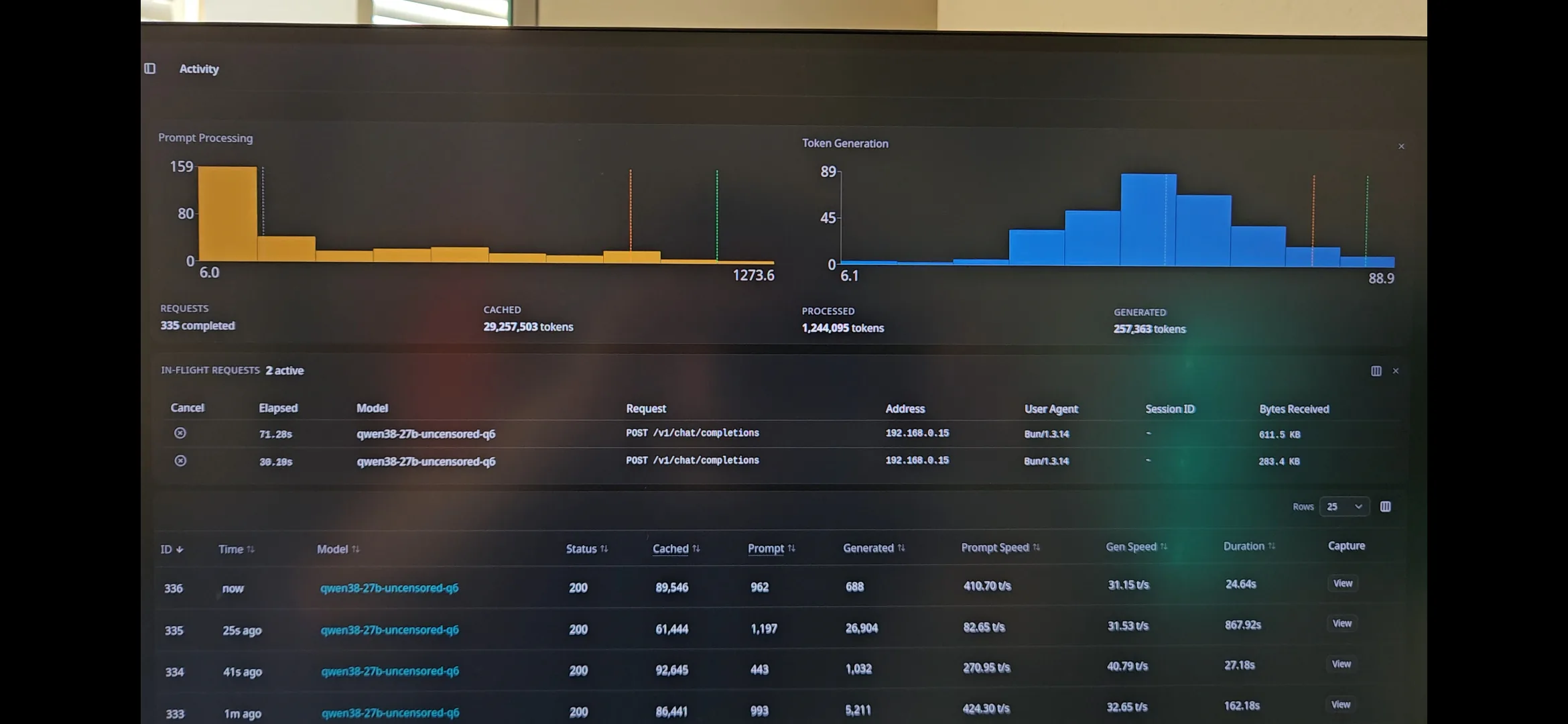
Different tasks need different trade-offs. A coding model might use a high quant and moderate context, while another configuration reserves most of the remaining memory for a much larger KV cache. llama-swap exposes them behind the same API instead of making me manually stop and start llama-server each time.
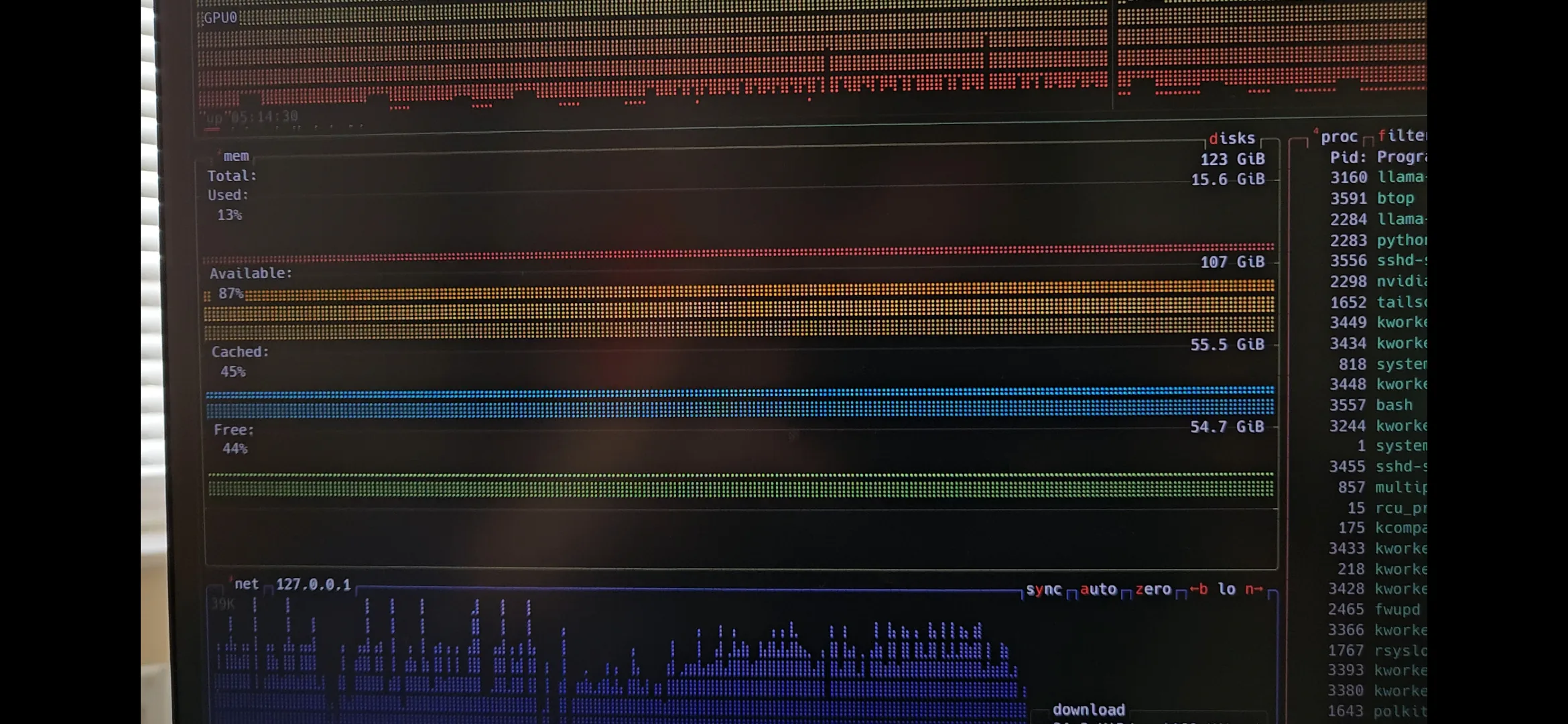
I use btop for machine monitoring and llama-swap for request-level information.
What 48 GB of VRAM actually changed
The two cards do not become one 48 GB GPU.
Each still owns its own 24 GB memory pool, and llama.cpp places model tensors and buffers across both devices. Data that needs to cross devices travels over PCIe. The useful result is roughly 48 GB of combined capacity for model sharding, not a physically unified pool.
Even with that caveat, moving from one 3090 to two changed which compromises I had to make. On one card, a modern dense model around 27B can fit at Q4 with room for a reasonable context window. Push the quant higher or allocate a large KV cache and VRAM becomes the main constraint again.
With two cards I can keep those models at higher quants, use substantially larger contexts, or run models that simply do not belong in 24 GB. That flexibility was the main reason I built the machine.
Qwen3.8-27B Q4_K_M Benchmark Results
Qwen3.8-27B shows what the second card contributes to a modern dense model. I benchmarked a 17,010,517,600-byte Q4_K_M GGUF fully resident across both GPUs with a 1:1 tensor split. Both RTX 3090s were limited to 250 W, and the server used Q8_0 K/V caches, Flash Attention, and 2,048-token batch and micro-batch sizes.
Context and MTP Performance
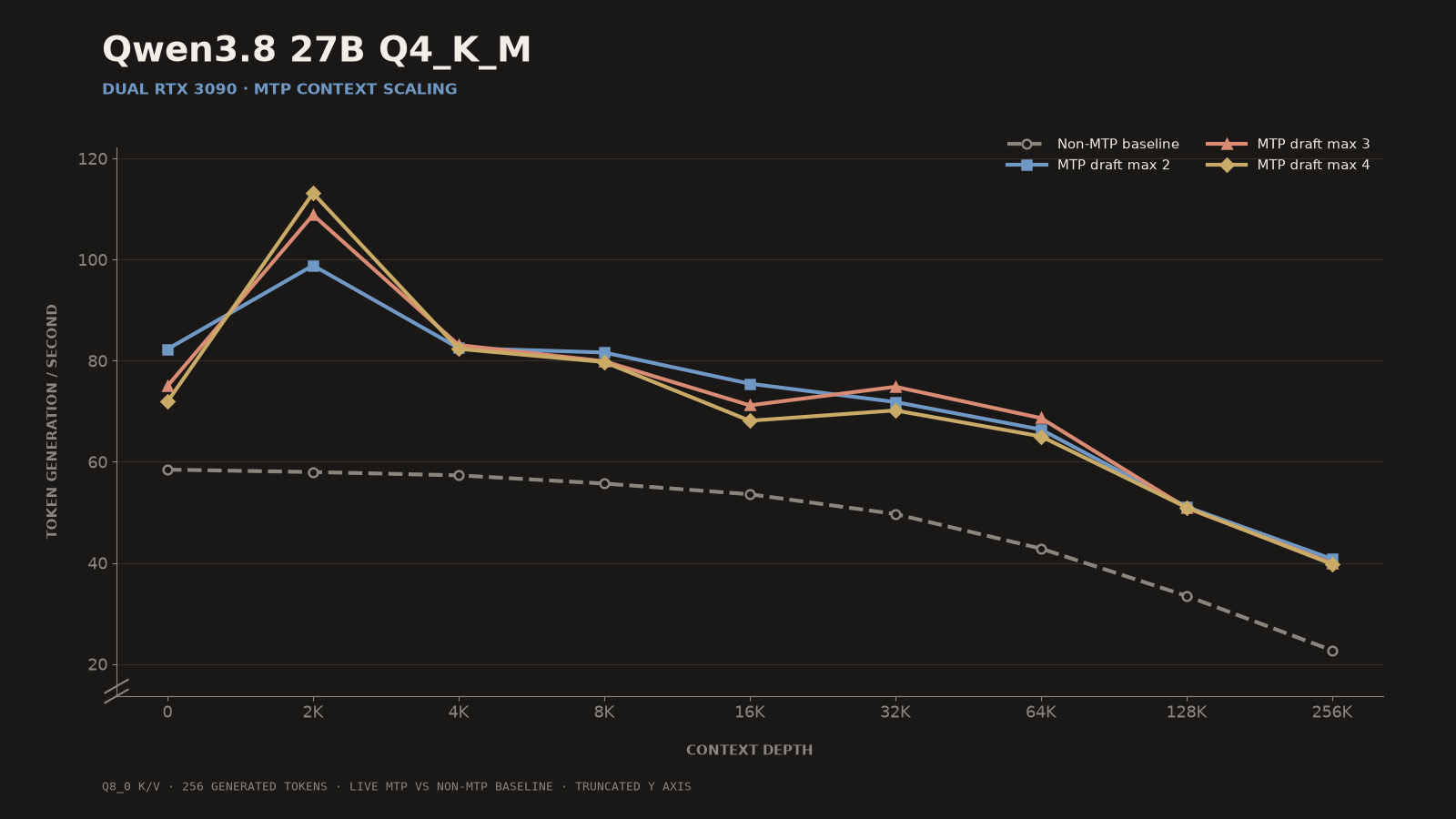
The non-MTP baseline declined from 58.45 tok/s with an empty cache to 22.68 tok/s at 256K depth. Native MTP remained practically useful throughout the window. Draft max two was the most consistent setting, producing 40.75 tok/s from a 261,888-token prompt while leaving 256 tokens for measured generation.
The MTP and non-MTP measurements used different llama.cpp builds and protocols, so the plotted differences are practical reference data rather than a controlled percentage-speedup experiment. The Qwen3.8-27B local inference article contains the complete context table, prompt-processing graph, draft-acceptance results, and methodology.
Concurrent Throughput
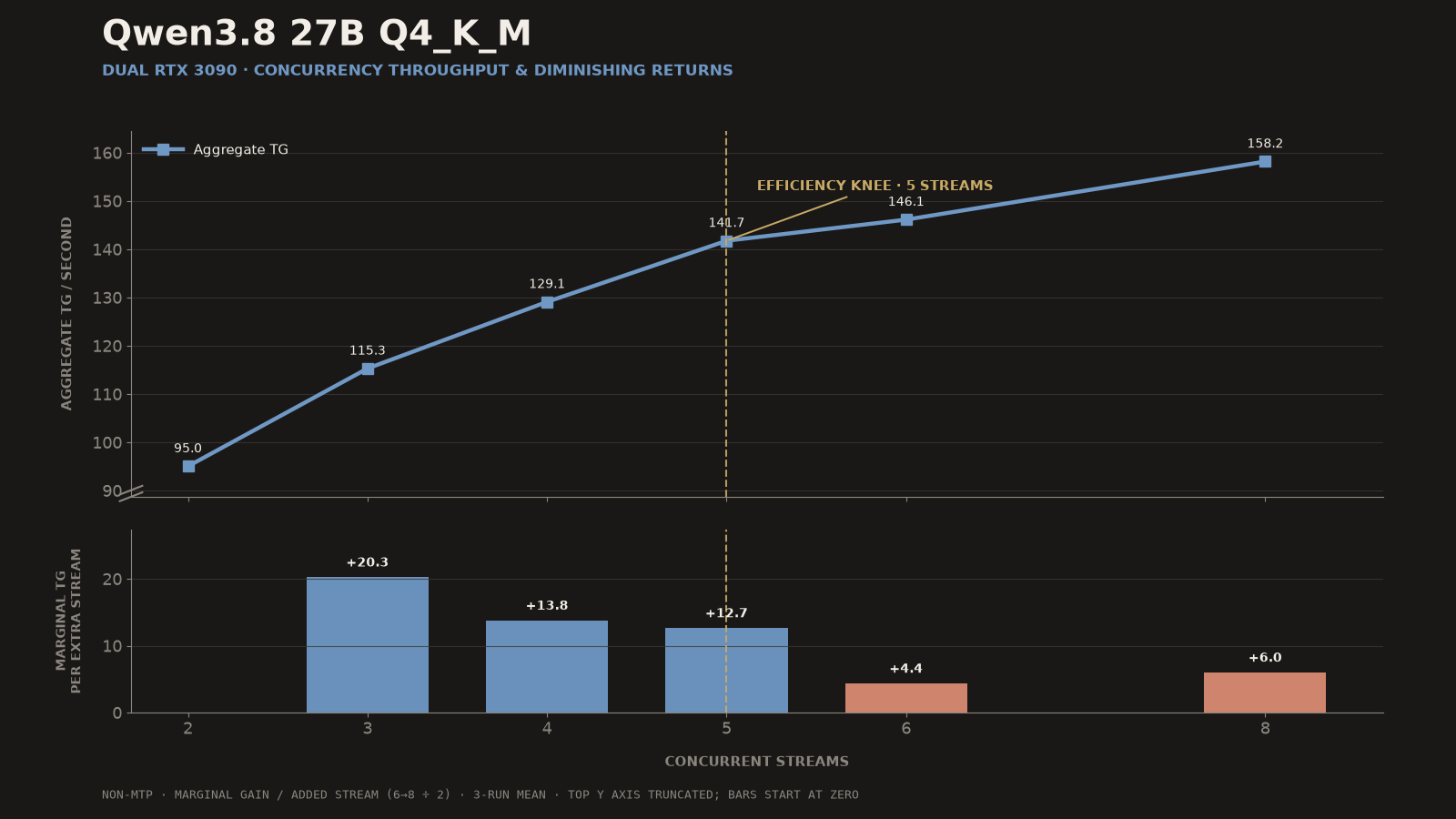
Five streams produced 89.6% of the maximum measured aggregate throughput while preserving 28.35 tok/s per stream. Eight streams increased the aggregate rate to 158.16 tok/s, but individual streams fell to 19.77 tok/s. The best setting therefore depends on the workload: five balances throughput and responsiveness, while eight maximizes batch output.
What 48 GB Enables
With the multimodal projector loaded, the model successfully allocated a 507,904-token Q8 KV-cache pool. A 509,952-token allocation failed with a CUDA out-of-memory error. During the capacity test, two slots received 253,952 tokens each. My current four-slot configuration divides the same pool into 126,976 tokens per slot.
That pool is server capacity shared between requests, not a single expanded model window. Qwen3.8-27B retains its native 262,144-token per-request limit unless context extension is explicitly enabled.
Running Llama 3.3 70B
I had wanted to run a proper 70B dense model locally for a long time, mostly because it was one of those hardware thresholds that remained annoying on a single consumer GPU. Llama 3.3 70B was the obvious first test.
At Q4_K_S across both GPUs, my llama.cpp context sweep measured 31.91 tokens/s with an empty cache and 18.5 tokens/s at 32K context. Those measurements used 275 W per card, not the current 250 W daily setting.
The complete setup and tables are in my RTX 3090 inference article, so I will not duplicate the benchmark data here. At these speeds it runs comfortably enough for interactive chat.
That does not make it better merely because it is 70B. The model has aged much faster than the hardware needed to run it.
Its instruction following is behind newer models, and its default prose has habits that are hard to stop noticing once you have spent time with current post-training. It mirrors the prompt’s wording too much, repeats information already supplied and tends toward a style that feels several model generations old. For coding, good current models around 30B outclass it.
A strong system prompt cleans up a surprising amount of the conversational behaviour. I still like having it available because it has interesting behaviour and distinctive quirks. For conversation and experimentation, it remains fun to run.
Why I usually run newer 27–35B models
Most of the time, the best use of 48 GB is not loading the largest model that fits.
Modern dense models around 27B give me room for a better quant and a large context without turning every request into a capacity exercise. Current Qwen-class models follow instructions more reliably and are substantially better for coding than Llama 3.3 70B in my use. Sparse models around this size can add much higher throughput when their active parameter count is small.
There are good reasons the industry moved toward sparse models. I would still like somebody to release another genuinely modern dense model around 70B, trained on current data and given current-quality post-training. This machine is now waiting for that comparison point.
Expansion plans and verdict
The frame has room for another four GPUs, although fitting them will require risers and a more deliberate power arrangement. That was part of choosing WRX80: I can expand the GPU side without immediately replacing the CPU, board and memory.
For now, two cards are the useful stopping point. They provide enough combined VRAM for 70B-class Q4 models and remove most context and quantisation compromises from the modern 27–35B models I use every day.
It is not a polished tower and none of the economics are balanced. The £100 CPU sits in a £500–£600 motherboard beside £250–£300 of RAM. Fans are attached with cable ties, one CPU-cooler fan is missing, and IPMI matters partly because a GPU covers the power button.
That is also why the build works. I spent money on the scarce parts that provide lanes and VRAM, bought the consumer GPUs used, and accepted an open frame instead of paying workstation-GPU prices for a neater result. For roughly £2,500–£3,000, I ended up with the 48 GB local-AI machine I actually wanted.